Phoenix Code vs Dillinger vs StackEdit: which Markdown editor?
By the Phoenix Code team · Last tested: July 2026 · Disclosure: we make Phoenix Code. We tested all three editors on the same document and note below where the other two win.
Here’s the quick summary: choose Dillinger if you want a fast, no-signup scratchpad that opens in the editor as soon as you visit the site. Go with StackEdit if you need a real offline app, for GitLab or blog publishing, and you’re okay with development stopping in 2023 and paying $5 for PDF export. Pick Phoenix Code if you want features like Mermaid diagrams, PDF export on your own computer, desktop apps, multi-file projects with Git, and a built-in AI assistant, all in a free, open-source editor.
How we compared: same test document (headings, bold, a table, a fenced code block) in each editor in the same browser, plus each project's public source code. Details in How we tested.
Feature comparison at a glance
Swipe the table sideways to see all three editors →
What we checked
Phoenix Code that's us
Dillinger
StackEdit
Writing
Start typing on the landing page
Opens the app at phcode.dev
Yes:The editor is the homepage
One click ("Start writing")
Live preview
Yes
Yes
Yes
Mermaid diagrams
Yes:Rendered live
Not supported (their own docs say so)
Yes:Plus KaTeX math
Built-in AI assistant
Yes:Claude Code integration
None found in the editor in our July 2026 test
—No
Exporting
PDF export
Yes:Free, runs on your machine
Yes:Free, but your text is processed on their server
Every cell above comes from our own testing or the projects' public source code and documentation, checked in July 2026. If you spot something outdated, tell us and we'll fix it.
Dillinger: the fastest scratchpad, recently rebuilt
First, a correction you'll see gotten wrong elsewhere: Dillinger is not abandoned. It was rebuilt on Monaco (the editor engine inside VS Code) with commits as recent as June 2026, and it now ships Vim and Emacs keybindings. Its biggest strength hasn't changed: the editor loads directly on the homepage, so you're typing Markdown two seconds after the page opens, with no account and no click-through.
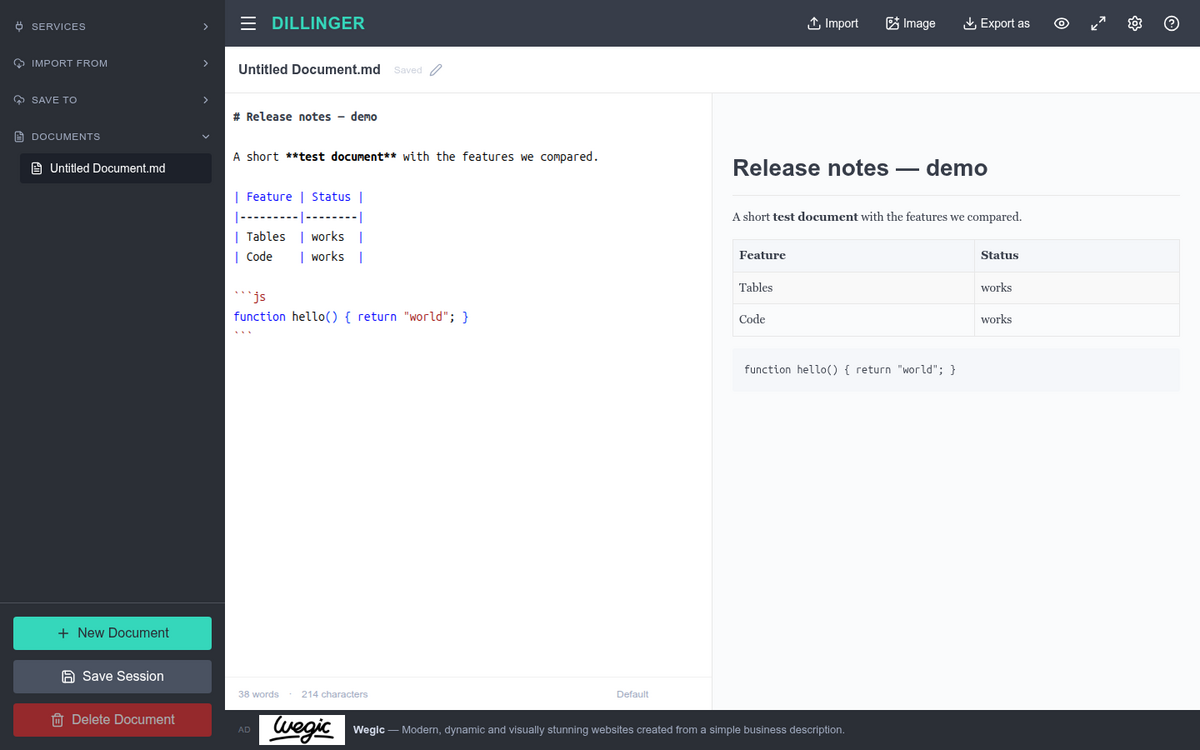
Our test document in Dillinger: tables and code blocks render well.
When we tested it, tables and syntax-highlighted code showed up clearly. Mermaid diagrams aren’t supported; Dillinger’s own guide lists that as a known limitation. You can export to Markdown, styled HTML, and PDF for free. One thing to note: PDF files are generated on Dillinger’s server, so your document is sent off your computer for that step. Their privacy policy says this is only temporary. Documents are saved in your browser’s localStorage, and you can also sync with GitHub, Dropbox, Google Drive, OneDrive, and Bitbucket. There’s just one small ad banner on the page.
Where Dillinger stands out
You can start using Dillinger right away; no other tool here lets you type instantly on the landing page. It supports five cloud-sync providers and offers Vim and Emacs keybindings through Monaco. If you just need to quickly paste, preview, and export Markdown a few times a month, Dillinger is tough to beat.
StackEdit: a top offline PWA, but no updates since 2023
StackEdit stands out for its features: it supports Mermaid and UML diagrams, KaTeX math, and lets you publish to GitHub, GitLab, Blogger, WordPress, and more. You can also use it offline, just like a desktop app.
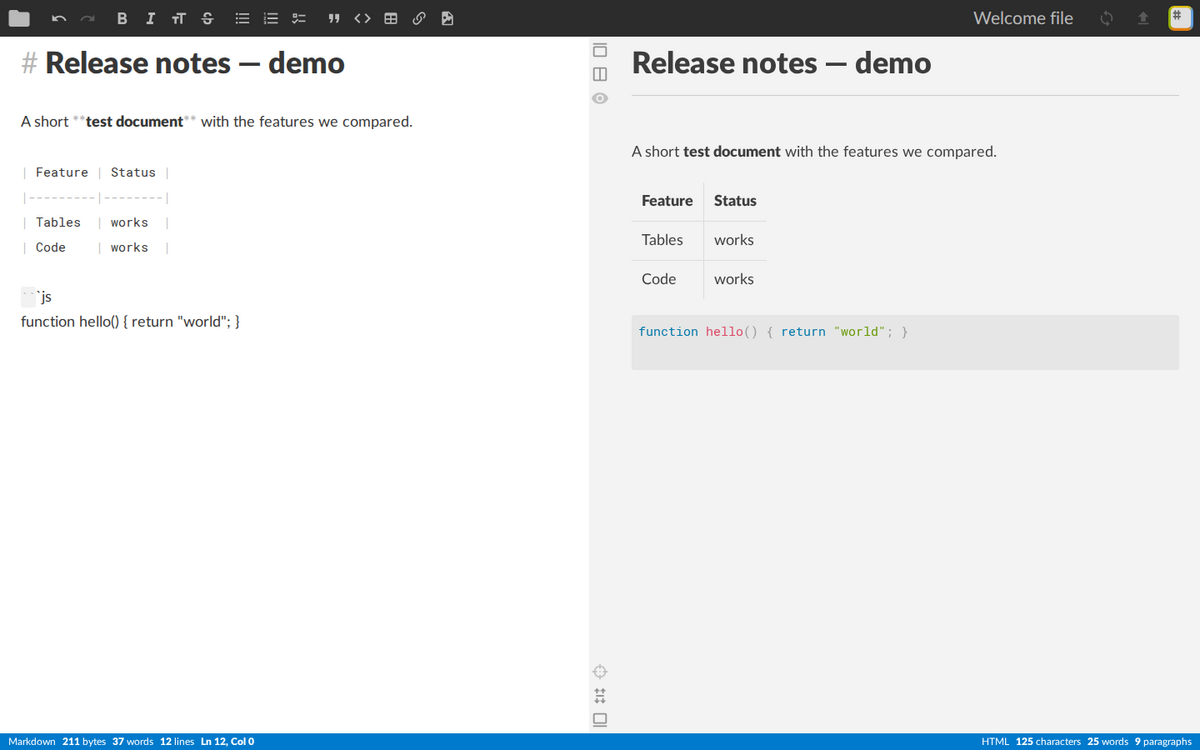
The same test document in StackEdit: rendering is excellent, but the project isn't moving anymore.
There are two things you should know before choosing StackEdit. First, development has stopped: the last update was in May 2023, and there are over 700 open issues with no responses. Second, exporting options are more limited than they seem. You can export Markdown along with HTML for free, but PDF, Word, EPUB, and LaTeX exports need a StackEdit sponsorship (starting at $5 for 3 months) and use StackEdit's server. The app says, "This feature is restricted to sponsors as it relies on server resources." Some sources claim StackEdit "has no PDF export," but that's not true: it does, but it's behind a paywall.
Where StackEdit stands out
StackEdit works best offline in your browser compared to the other two. It also offers the most publishing options: if you post to Blogger or WordPress, StackEdit does what the others can't. Its rendering for Mermaid, KaTeX, and ABC musical notation is still excellent.
Phoenix Code: a complete editor, not just a simple textbox
Phoenix Code does things differently. Its Markdown editor is built into a real, open-source code editor. You get live previews with Mermaid diagrams, tables, and highlighted code. Unlike a basic scratchpad, you can work with whole-folder projects, use built-in Git, and run free desktop apps on Windows, macOS, and Linux. There's also a built-in Claude Code AI assistant to help draft and restructure your Markdown. When you export to PDF, everything happens on your computer, so your document never leaves your machine.
When Phoenix Code might not be the best fit
To be fair, Phoenix Code is a full editor, so it's heavier than Dillinger if you just want to quickly paste and preview something. For that, Dillinger is the better choice. Phoenix Code also doesn't offer real-time multi-user collaboration, so if your team needs to edit together at the same time, HackMD is a better fit. The WYSIWYG editing mode, where you write directly in the rendered view like in Word, is only available in the paid Pro plan. The classic source-plus-preview editing remains free.
How we tested
In July 2026, we opened the same test document—complete with headings, bold text, a Markdown table, and a fenced JavaScript code block—in all three editors using the same Chromium browser. We took screenshots of the results you see above. For maintenance details like commit dates, open issues, and licenses, we checked each project's public GitHub repository. We got export and sponsorship information by reading StackEdit's and Dillinger's published source code and policies, not from third-party lists.
We only claim what we could verify. We did not live-test StackEdit's sponsor-only export features or try every Dillinger cloud-sync provider from start to finish.
Which should you choose?
If you just want to paste, preview, and go: Dillinger. It gives you the quickest way from clipboard to formatted preview, no account needed, and free PDF export. Just remember, the PDF step uses their server.
If you write offline in your browser or want to publish to a blog: StackEdit. Its offline PWA and Blogger or WordPress publishing features are still the best, as long as you are okay with no new updates and the $5 fee for PDF export.
If you work on READMEs, documentation, or projects with multiple files: Phoenix Code. It offers Mermaid diagrams, Git integration, desktop apps, AI help, and local PDF export, all in one free tool.
If you need real-time team collaboration: none of these three. Look at HackMD or CodiMD instead. (See? Told you we'd be honest.)
Common questions
Is Dillinger abandoned?
No. People say this because Dillinger stopped tagging GitHub releases a while back, but the project was rebuilt on Monaco with React and still had commits as recently as June 2026. Look at the commit activity instead of the release page.
Does StackEdit still work?
Yes, the app still runs and looks great. However, the last code update was in May 2023, there are over 700 open issues with no replies, and a Dropbox sync bug from 2022 is still not fixed. It works now, but no one is maintaining it for the future.
Which Markdown editor works offline?
StackEdit works offline in your browser as a PWA. Phoenix Code also works offline with its free desktop apps for Windows, macOS, and Linux. Dillinger saves your text in localStorage if you lose connection, but it is not designed for offline use.
Which exports PDF for free without a server?
Only Phoenix Code lets you export PDFs for free and entirely on your own computer. Dillinger's PDF export is free but happens on their server. StackEdit's PDF export is also server-side and needs a $5 sponsorship.
Try the free Markdown editor
Live preview, Mermaid diagrams, PDF export on your machine, and Claude AI. Free and open source.
Cookies help us make your experience better by tailoring our site to your needs. By clicking "Accept All", you consent to our use of cookies. Privacy Policy