Phoenix Code is a free, open-source Markdown editor and viewer. Write in Markdown and watch the formatted preview update live: tables, code blocks, images, and diagrams. Use it instantly in your browser or download the desktop app.
Free & open source · Browser or desktop · No account required
Live PreviewMarkdown Viewer & Reader ModeWYSIWYG Editing (Pro)Free & Open SourceWindows, Mac, Linux & BrowserClaude Code AI Built In
A Markdown Editor, Viewer, and Preview in One
Markdown is the plain-text format behind README files, documentation, notes, and blogs. A good Markdown editor shows you the formatted result while you type. Phoenix Code does exactly that, with a live preview that renders your document as you write.
It is also a full Markdown viewer. Open any .md file and switch to reader mode to see it as a clean, formatted document, great for reading a README or reviewing docs without editing them.
And because Phoenix Code is a real code editor, you get more than a throwaway markdown preview tool: syntax highlighting, multi-file projects, Git integration, Claude Code AI assistance, and PDF export are all built in.
Everything You Need to Write Markdown
From quick notes to full documentation: write, preview, and publish Markdown in one place.
Live Markdown Preview
Write Markdown and see the formatted document update instantly beside it, with no save or refresh needed.
Pro
Document Editing for Markdown
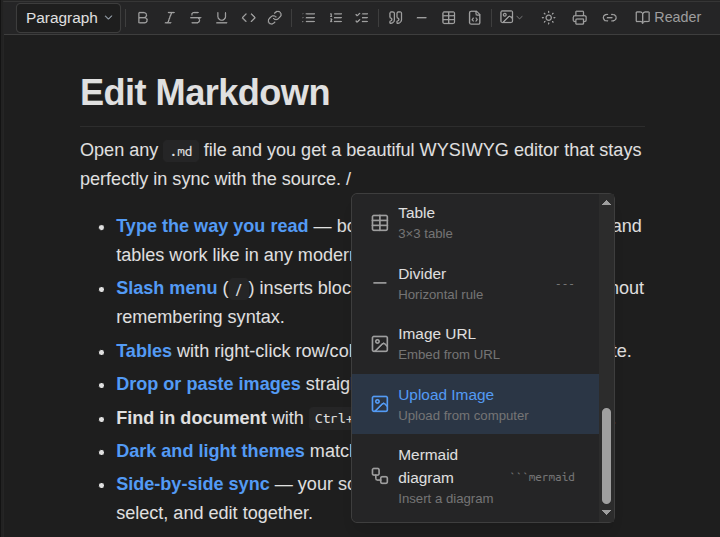
Edit directly in the rendered document, like Word or Google Docs, while keeping clean Markdown underneath.
Claude Code AI Assistant
Draft, restructure, summarize, and polish Markdown with Claude Code. Use your existing login/key; your documents stay local.
Tables, Code Blocks & Diagrams
Create GitHub-style tables, highlighted code blocks, and diagrams that render directly in preview.
Paste & Add Images Easily
Paste, upload, or link images without leaving your document to host files elsewhere. Phoenix Code can host uploaded images for you.
Print & Export to PDF
Turn rendered Markdown into a polished PDF, ready to share, submit, archive, or print.
AI That Writes Markdown With You
Phoenix Code includes built-in AI powered by Claude Code. Ask it to draft a README, restructure a document, tidy tables, fix grammar, or summarize long docs, right inside your Markdown editor.
Bring your existing Claude Code subscription or a compatible login/key; no separate AI plan needed. Your documents stay on your machine.
Free Markdown Editing, Forever
The core Markdown experience is free and open source. Pro adds visual editing on top.
Free
Markdown editing with syntax highlighting, live preview, reader mode, images, tables, code blocks, diagrams, and PDF export, in your browser or on desktop. Free forever.
Phoenix Pro
WYSIWYG Markdown editing like Word or Google Docs: write visually while Phoenix Code maintains clean Markdown underneath. Includes AI assistance and visual web editing.
Most online markdown editors are throwaway textboxes: paste, preview, lose your work. Phoenix Code is a real editor: open whole folders, edit multiple documents, track changes with built-in Git, and keep working offline with the free desktop app.
Your files also stay yours. Nothing is uploaded to a server, whether you use the browser editor or the desktop app, your Markdown lives on your machine. No account, no sign-up, no lock-in.
How to Open and Edit a Markdown (.md) File
From zero to a formatted document in under a minute.
Open Phoenix Code
Launch the editor instantly at phcode.dev, or install the free desktop app for Windows, macOS, or Linux.
Open or create a .md file
Open the folder with your existing Markdown files, or create a new file with the .md extension.
Edit with live preview
Write Markdown and watch the formatted preview update live. Switch to reader mode to view the finished document.
Export or publish
Print or export the rendered document to PDF, or commit your changes with the built-in Git integration.
Mermaid Diagrams, Tables & Code Blocks
Phoenix Code renders Mermaid diagrams live as you type: flowcharts, sequence diagrams, and Gantt charts appear in the preview beside your Markdown source. GitHub-style tables and syntax-highlighted code blocks render the same way, which makes it a practical Markdown editor for technical docs, READMEs, and architecture notes.
Convert Markdown to PDF, Word & HTML
Export happens on your machine: print or save the rendered document to PDF directly from the editor, with no server round-trip and no upload.
Need a Word document instead? Use the free DOCX to Markdown converter to go from Markdown to Word and back. And because Markdown is plain text, the rendered preview is clean HTML you can copy anywhere.
Open & View .md Files Online
Received a .md file and just need to read it? Open it in the browser editor and switch to reader mode; it works as an online .md file viewer and opener, with no installation or account required.
Markdown is not the only format Phoenix Code renders as you type. It also works as a free online SVG code editor, opening .svg files as editable code with the rendered image updating live beside it.
How It Compares to Dillinger & StackEdit
Wondering how Phoenix Code stacks up against other online Markdown editors? We tested Dillinger, StackEdit, and Phoenix Code side by side on the same document. See the full Markdown editor comparison for the results.
Frequently Asked Questions
Yes. Markdown editing with live preview and reader mode is completely free in Phoenix Code, both in the browser at phcode.dev and in the desktop app. The optional WYSIWYG editing mode is part of Phoenix Pro.
Open phcode.dev in your browser or launch the Phoenix Code desktop app, then open the folder that contains your Markdown file and click the .md file. It opens instantly with syntax highlighting and a live preview, with no plugins or setup required.
Yes. Phoenix Code includes a reader mode that renders your Markdown as a clean, formatted document, ideal for reading README files, notes, and documentation without touching the source text.
Yes. Phoenix Code renders GitHub-style tables, fenced code blocks with syntax highlighting, embedded images, and diagrams in the Markdown preview, so what you see matches what your readers will see.
Yes. With Phoenix Pro you can edit Markdown visually, like writing in Word or Google Docs, while Phoenix Code keeps the underlying Markdown text clean. Raw editing with live preview stays free forever.
Yes. The full editor runs in your browser at phcode.dev with no download and no account required. If you prefer a desktop app, free installers are available for Windows, macOS, and Linux.
Yes. You can print or export your rendered Markdown to PDF directly from Phoenix Code, and for Word documents you can use our free DOCX to Markdown converter.
Yes. Phoenix Code integrates Claude Code as a built-in AI assistant. Bring your existing Claude Code subscription or a compatible login/key and use it to draft, edit, and improve Markdown documents right in the editor.
Start writing Markdown now
A free, open-source Markdown editor and viewer with live preview, in your browser or on your desktop.
Cookies help us make your experience better by tailoring our site to your needs. By clicking "Accept All", you consent to our use of cookies. Privacy Policy